How To Find Bargains In B&M Using The B&M App Price Scanner
This post may contain Affiliate Links
If you love finding bargains in B&M, this quick tip could help you spot reduced items and check prices while you’re shopping.
The B&M app has a handy scanning feature that allows you to check the price of items in-store. It can be particularly useful when you’re looking for clearance bargains, reduced items, or simply want to check the price of something before heading to the checkout.
Quick note: App features and layouts can change over time, so the exact steps may look slightly different in the future. These instructions were correct when I checked the B&M app at the time of posting.
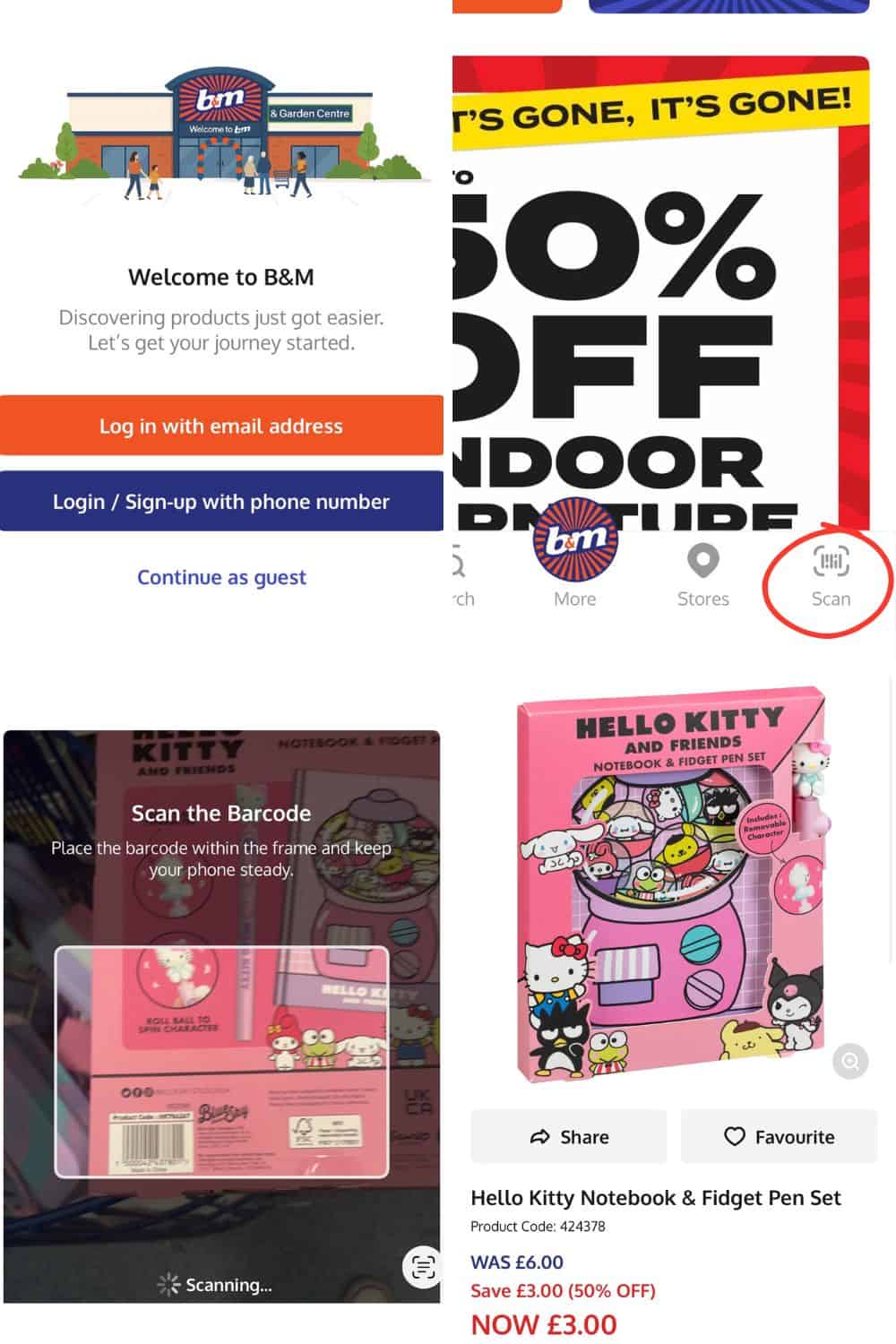
How To Use The B&M Price Scanner
You don’t necessarily need to create an account to use the app.
Simply:
- Download the B&M app from either Google or Apple
- Open the app and continue as a guest (where available).
- Select the scan feature.
- Scan the barcode of an item to check its price.
The B&M price scanner is useful for:
- Double-checking the price of sale items.
- Checking items without price labels.
- Finding out the price of random items you’ve picked up around the store.
- Checking whether something has been reduced or reduced further than the shelf edge label.
While many B&M products do have shelf labels or price stickers, this isn’t always the case.
Items can sometimes be moved around the store, and clearance products don’t always have obvious signage.
Finding B&M Clearance Bargains
One of the best things about B&M is that clearance bargains can appear throughout the store.
Sometimes there will be a dedicated clearance section, especially for seasonal items. For example, after Christmas, you’ll often find decorations, wrapping paper and festive items heavily reduced.
However, B&M reductions aren’t always kept in one place. You may also find reduced items in their usual location, with the shelf-edge ticket showing the discounted price.
Short-dated food items are often located near the tills, so it’s always worth having a quick look before paying.
My local B&M also has a dedicated clearance area. At the moment, as we’re heading into summer, it’s full of leftover Easter and Father’s Day items.
The best tip is to keep looking around the store rather than heading straight to the clearance section, as you can find bargains in unexpected places.
When Does B&M Reduce Items?
B&M tends to reduce items at the end of seasons, with some of the biggest clearance events usually happening:
- After Christmas.
- At the end of summer.
- When seasonal ranges need to make way for new stock.
During these times, it’s possible to find items reduced significantly, sometimes down to just a few pence.
Food items, especially short-dated products, are often reduced daily, although availability will depend on your local store.
When B&M Yellow Sticker Items Are Worth Looking For
While B&M isn’t usually the first shop people think of for yellow sticker bargains, reduced food items can be a great way to save money.
The best time to check is often later in the day or when your local store is updating stock.
Personally, I find that there tends to be more non-perishable food reductions. For example, I recently grabbed cereal multipacks for 50p each.
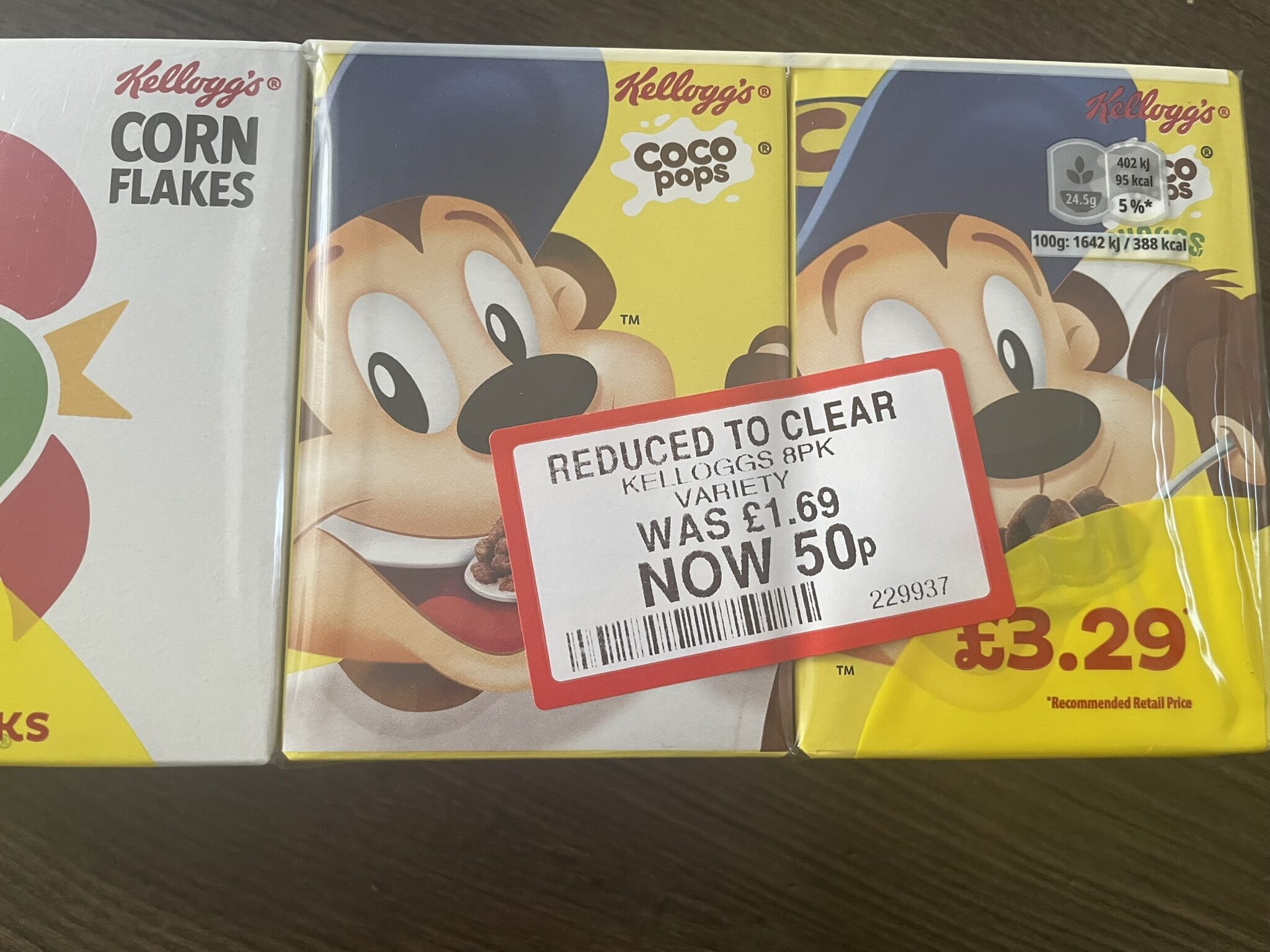
Although the date was this month, as it’s best before, I know it’ll be safe to eat for a while yet.
When The B&M Price Scanner Doesn’t Work
Of course, there are occasions when things don’t go quite as smoothly.
Sometimes you may scan an item, and it isn’t recognised. This could mean that the item is no longer active on the system, has been discontinued, or has been removed from sale for another reason.
I had this happen with an item that was supposed to be £1. I’d spotted it online, found it in my local store, and took it to the checkout. Unfortunately, it wouldn’t scan, and the cashier wasn’t able to put it through.
They did call a manager, but as a queue was starting to build, I decided to leave it. It was a little frustrating after making a special trip, but these things do happen.
Shop Smart With B&M Bargains
The B&M app price scanner is a really useful tool for bargain hunters, especially if you’re shopping for gifts, stocking fillers, toiletries or items to donate.
However, I do try to shop with some level of mindfulness. A bargain isn’t always a bargain if it’s something you’ll never use, so while I love finding reduced items, I try not to buy things simply because they’re cheap.
The best bargains are the ones that save you money on things you genuinely need or will enjoy using.
Frequently Asked Questions
Can You Scan Prices In B&M?
Yes, the B&M app has a price scanner feature that you can use to check the price of items while shopping in B&M stores.
It’s useful for checking sale items, finding prices for products without labels, and confirming whether an item has been reduced.
Does B&M Have A Price Scanner?
Yes, you can use the B&M app as a price scanner when shopping in-store.
Simply download the app and use the scan feature to check the barcode of items.
How Do I Find B&M Clearance Items?
B&M clearance items can be found throughout the store.
Some stores have dedicated clearance areas, especially for seasonal items such as post-Christmas bargains. However, reduced products can also stay in their normal location, with only the shelf-edge ticket showing the lower price.
Short-dated food items are often found near the tills.
The B&M price scanner can also help if you’re unsure whether an item has been reduced.
When Does B&M Reduce Items?
B&M usually reduces items at the end of seasons, with major clearance periods often happening after Christmas and at the end of summer.
Food reductions can happen daily, particularly for short-dated items, but availability varies between stores.
Looking for more ways to cut costs? Take a look at my Money Saving Hub where I’ve brought together all of my best tips, tricks and guides to help you spend less and save more.